ASUS Shadow Boost is one of ASUS’s advanced display technologies, equipped to improve image quality. So what is ASUS Shadow Boost? What are the features of Shadow Boost on ASUS monitors? Let’s take a closer look together.
I. What Is ASUS Shadow Boost?
ASUS Shadow Boost is a feature from ASUS that helps improve brightness and contrast between dark areas and bright areas of images displayed on the screen.
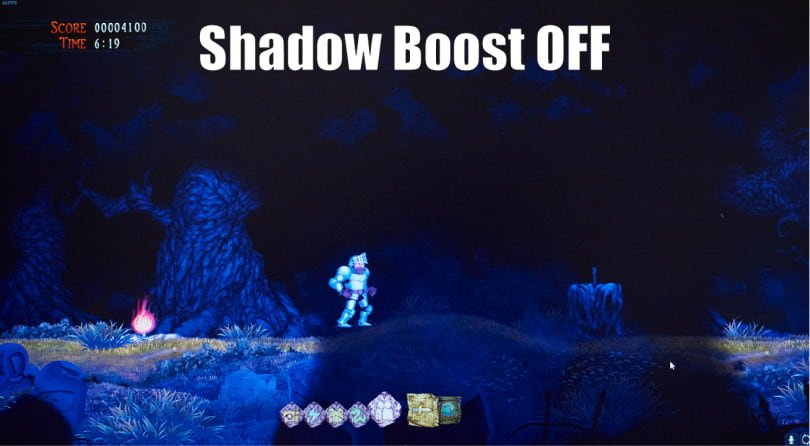
This feature is equipped on ASUS ROG gaming monitors and some other high-end ASUS monitors.
II. Features of Shadow Boost on ASUS Computer Monitors
1. Optimizing screen brightness
Contrast is the difference between the maximum and minimum brightness that a monitor can display. In simple terms, contrast is a parameter that indicates the difference between white and black on the screen.
ASUS Shadow Boost provides the ability to increase brightness in dark areas of the screen without losing image detail. When this feature is enabled, dark areas on the screen become brighter, helping gamers see details, objects, and items in games more clearly.
In addition, ASUS Shadow Boost also works well for image design tasks, video editing, and color blending in applications such as Photoshop, Illustrator, and AutoCAD.
Besides that, ASUS Shadow Boost also allows users to adjust screen brightness more easily to suit their usage needs and surrounding lighting conditions. On some MSI monitors, there is a similar option called HDCR, which also helps make dark areas easier to see when details are hard to notice.
2. Improving contrast
ASUS Shadow Boost helps improve the contrast of images displayed on the screen, allowing visuals to become clearer and sharper, creating a better viewing experience.
When playing games, high contrast is an important factor for displaying color details and shadows in games. Typically, for FPS games such as PUBG or Valorant, ASUS Shadow Boost helps players quickly detect enemies hiding in dark areas of the map.
Or for MOBA games like Dota 2 or League of Legends, this feature helps improve overall graphic quality, giving players a better gaming experience.
3. Reducing glare
ASUS Shadow Boost helps reduce external glare and balances screen brightness with natural light. This allows users to easily view the computer screen under different lighting conditions without needing to constantly adjust display settings.
One of the benefits of ASUS Shadow Boost is helping reduce eye strain during long periods of use. With ASUS Shadow Boost, screen brightness is intelligently adjusted to match surrounding lighting conditions, helping reduce eye fatigue, increase work productivity, and provide a more comfortable gaming experience. LG monitors also have a similar feature called Black Stabilizer, which helps brighten dark scenes so objects and enemies are easier to spot.
III. How to Enable Shadow Boost
To enable Shadow Boost on an ASUS monitor, follow these steps:
Step 1: Press the Menu button on the back of the ASUS monitor.
Step 2: Use the navigation buttons to select Game Visual.
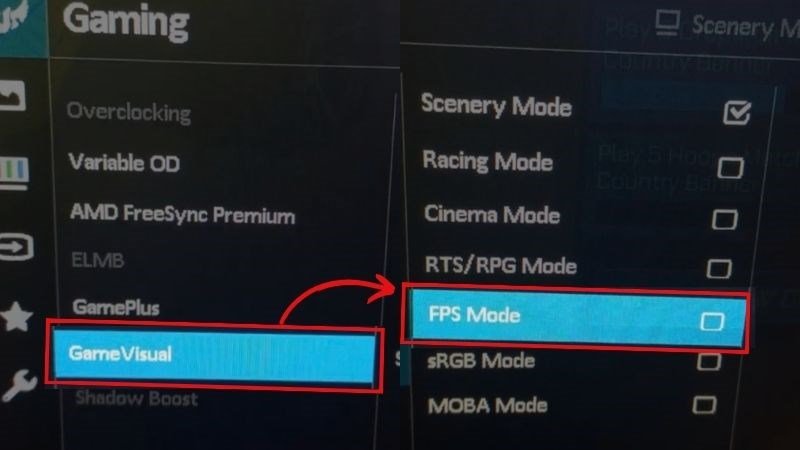
Step 3: Press the Enter button to access the Game Visual menu, then use the navigation buttons to select FPS Mode.
Step 4: Use the navigation buttons to select Shadow Boost and adjust the Shadow Boost brightness level according to your preference.
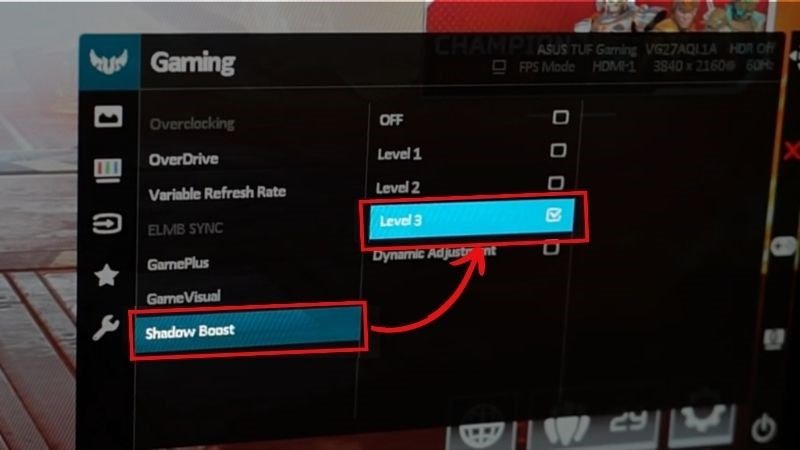
Step 5: Press the Menu button to exit the menu. Done.
Note: Shadow Boost is only supported on some ASUS monitors and may not be available on certain models. Please check your ASUS monitor user manual for more details.