LG is one of the leading technology brands in the monitor market. Through many decades of development, LG monitors have continuously been researched and improved with various supporting technologies to enhance the user experience. In this article, we will introduce the Black Stabilizer technology that is commonly equipped on LG gaming monitors. Let’s take a closer look.
What Is Black Stabilizer?
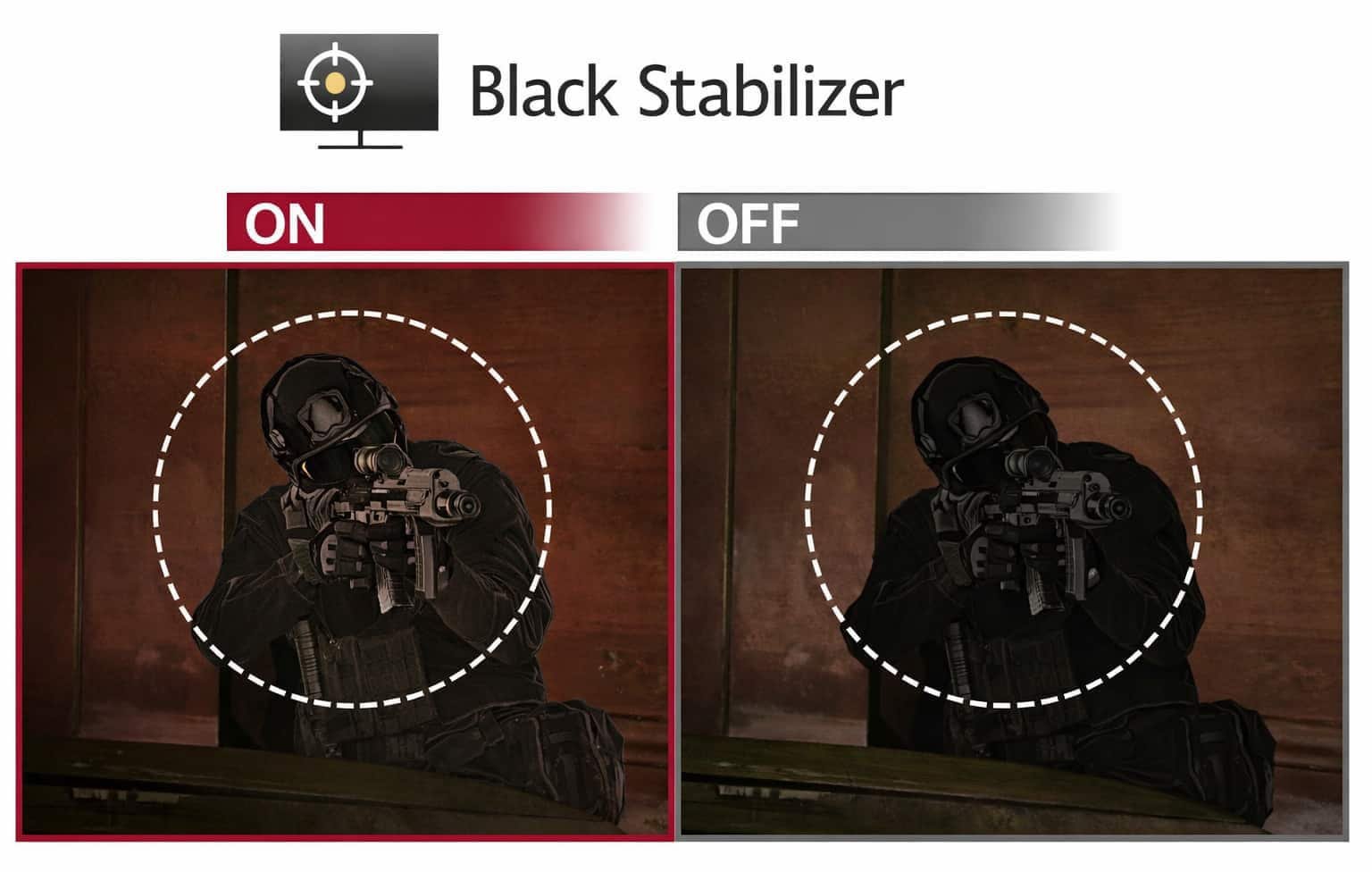
Black Stabilizer (dark balance feature) is a technology researched and developed by LG and integrated into many of its monitors. When a display is equipped with this feature, it can analyze pixel brightness levels in detail and adjust brightness in real time. The goal is to improve visibility in dark areas while still maintaining overall image quality. On ASUS monitors, there is a similar feature called Shadow Boost, which also helps make dark areas easier to see during gameplay.
▲ Black Stabilizer settings screen. Increasing the level improves visibility in dark areas.
At first, this concept may sound a bit difficult to understand, so let’s look at a practical example. When applied in games, Black Stabilizer is especially useful for gamers. It helps players see enemies or obstacles more clearly in dark scenes, allowing them to gain an advantage in fast-paced games that require high accuracy. On some MSI monitors, there is a similar option called HDCR, which also helps brighten dark areas on the screen when details are hard to see.
How Does LG Black Stabilizer Work? Is It Automatic?
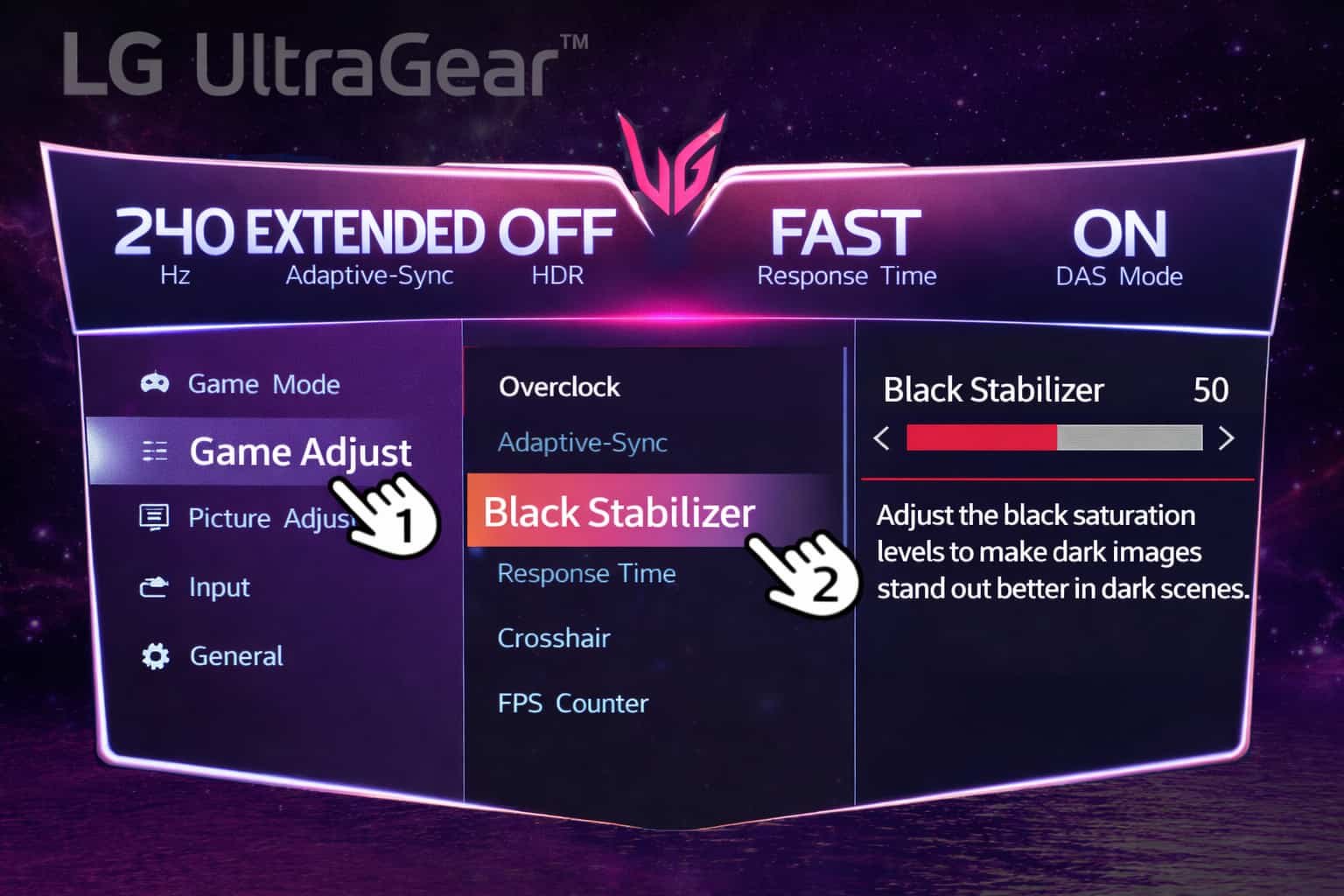
▲ Black Stabilizer settings screen. Increasing the level improves visibility in dark areas.
Currently, Black Stabilizer is not automatic. Users can manually turn it on or off. To activate Black Stabilizer, you can follow these steps:
Step 1. Access the OSD controls on your LG monitor
Open the LG OnScreen Control software to navigate to the system menu.
Step 2. Select the menu in OSD
Find and select the Menu or Settings option within the OSD software.
Step 3. Adjust dark area visibility
Select Black Stabilizer or Shadow Control in the menu. You will see an adjustable slider, or on older versions, a simple On/Off option.
Step 4. Save settings and exit
Once activated, Black Stabilizer will provide a clearer and brighter image, especially in dark scenes.
4 LG Monitors Featuring Black Stabilizer
1. LG 24GQ50F-B / 23.8-inch Monitor
The LG 24GQ50F-B (23.8-inch) is designed for gamers who want the best possible gaming experience. It features a 165Hz refresh rate, 1ms response time, and AMD FreeSync technology. These specifications support fast-moving visuals and help players gain an early advantage over opponents.
2. LG 27GQ50F-B / 27-inch Monitor
The LG 27GQ50F-B (27-inch) supports a 165Hz refresh rate, delivering smooth and visually pleasing motion handling. With a faster response time, it gives players a competitive edge by reducing ghosting, motion blur, and delivering instant action response.
AMD FreeSync technology helps eliminate screen tearing, ensuring smooth and seamless visuals at high resolutions, even during fast-paced gaming scenes.
3. LG 24″ 24MP88HV-S Monitor
The LG 24MP88HV-S features an ultra-slim design with four-sided thin bezels, allowing for immersive content display. With its elegant and refined style, this monitor adds a distinct visual touch to both study rooms and office spaces.
The ArcLine stand design offers an artistic look while maintaining stability and elegance. The monitor also delivers excellent color performance with 99% sRGB coverage and effective noise reduction, resulting in accurate and realistic images.
4. LG 27MP60G-B.ATV Monitor
The LG 27MP60G-B.ATV is equipped with a Full HD IPS panel that delivers sharp and vibrant visuals, along with AMD FreeSync for smooth display performance. It offers accurate color reproduction and wide viewing angles.
The modern monitor design features a V-shaped stand and slim bezels, making it suitable for a wide variety of setups and spaces.
In this article, we have explained what Black Stabilizer is and introduced four LG monitors that feature this technology. If you found this information useful, don’t forget to like and share it with others.